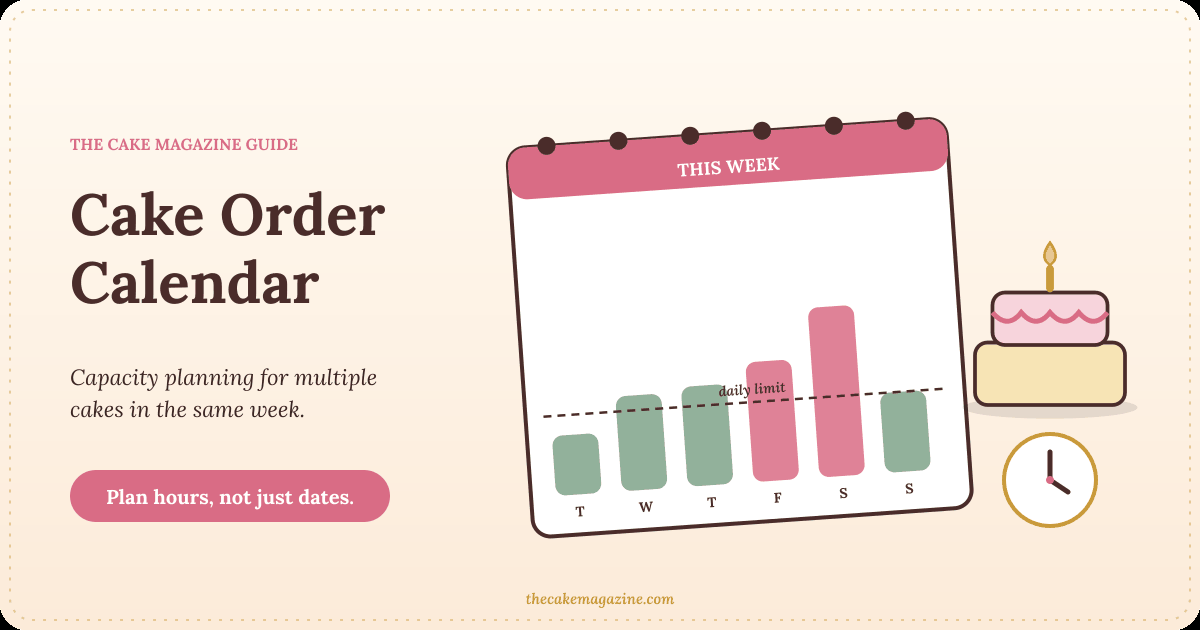
Most overbooked weeks do not start with a bad decision. They start with three reasonable yeses. A birthday cake on Thursday, a two-tier anniversary cake on Saturday, a dozen cupcakes someone needs by Friday, and suddenly the oven schedule looks like a game of Tetris played in the dark. A good cake order calendar is the tool that stops that from happening. It shows you, before you say yes, whether the week can actually hold another cake, and it gives you a calm, fair answer when it cannot.
A cake order calendar works when it tracks hours of real work instead of the number of cakes. Time a few typical orders, decide how many hands-on hours you can honestly give each day, keep a buffer of about a quarter of that time, and place each order on the days its baking, filling and decorating will actually happen. Then set a simple rule: if a new order pushes any day past its limit, you move it, price it as a rush or decline it.
- Why a cake order calendar matters more than your oven
- Capacity is hours, not cakes
- Time your cakes before you build the cake order calendar
- How to build a cake order calendar step by step
- A worked week: five cakes, one baker
- The hidden hours your cake order calendar must hold
- Bottlenecks: oven, fridge, decorating and driving
- Booking rules for a cake order calendar that holds up
- Rush orders, waitlists and the graceful no
- Peak weeks, holidays and blackout dates
- Paper, spreadsheet or shared calendar: choosing a format
- Cake order calendar mistakes and how to fix them
- Setups for solo bakers, weekend bakers and small teams
- FAQ
- Final thoughts
Why a cake order calendar matters more than your oven
Ask a baker what limits how many cakes they can sell and most will point at the oven, the fridge or the mixer. Those do matter, and we will get to them. But the real limit is almost always the baker. A cake order calendar is not really a list of dates. It is a picture of how much attention you have, spread across the week, and who is going to get it.
Think about what a single custom cake asks of you. There is the inquiry and the quote, the shopping, the baking, the cooling, the filling, the crumb coat, the chill, the final decoration, the box, the label and the hand-off. A cake that sells for one price on a Saturday has quietly claimed time on Tuesday, Wednesday, Thursday and Friday as well. If your calendar only shows Saturday, it is hiding four days of work.
That hidden work is why bakers get into trouble in the same predictable way. Each cake looks manageable on its own. Together they stack onto the same Thursday night, and the cake that suffers is usually the one for the customer who was easiest to say yes to. A working cake order calendar makes the stacking visible while there is still time to do something kind about it.
What a good calendar actually does
It helps to be specific about the job, because a calendar that only records orders is just a diary. A useful cake order calendar does five things at once.
- Shows load by day. You can see at a glance that Friday is full even though only one cake is picked up that day.
- Protects your buffer. It keeps a slice of every day empty for the things that always go wrong.
- Answers new inquiries fast. You can say “I have room on the 14th” without a long internal debate.
- Prevents double promises. No two cakes are secretly relying on the same oven hour.
- Keeps you honest about rest. Days off are on the calendar the same way orders are.
None of this needs special software. Plenty of bakers run a perfectly good cake order calendar on a wall planner and a pencil. What matters is the thinking behind it, and that is what the rest of this guide builds, step by step.
Where this fits. This article is the scheduling layer of a home or small bakery. If you are still setting up the basics, start with our guide to how to start a home cake business. If you want the step-by-step workflow for a single order, pair this with the three-day cake production schedule.
Capacity is hours, not cakes
The most common planning mistake is the simplest one: counting cakes. “I can do three cakes a week” sounds like a rule, but it falls apart the moment a two-tier wedding-style cake and a plain sheet cake both count as one. A cake order calendar built on cake counts will feel fine right up to the week it does not.
Count hours instead. Every order has a cost in hands-on time, and every week has a limit on how much of that time you have. The whole system is just the comparison between those two numbers, day by day. Once you think this way, questions like “can I take one more?” become arithmetic rather than anxiety.
Three numbers every baker should know
You only need three figures to start. You can refine them later, but even rough versions are far better than a gut feeling at 9 p.m. when a message arrives.
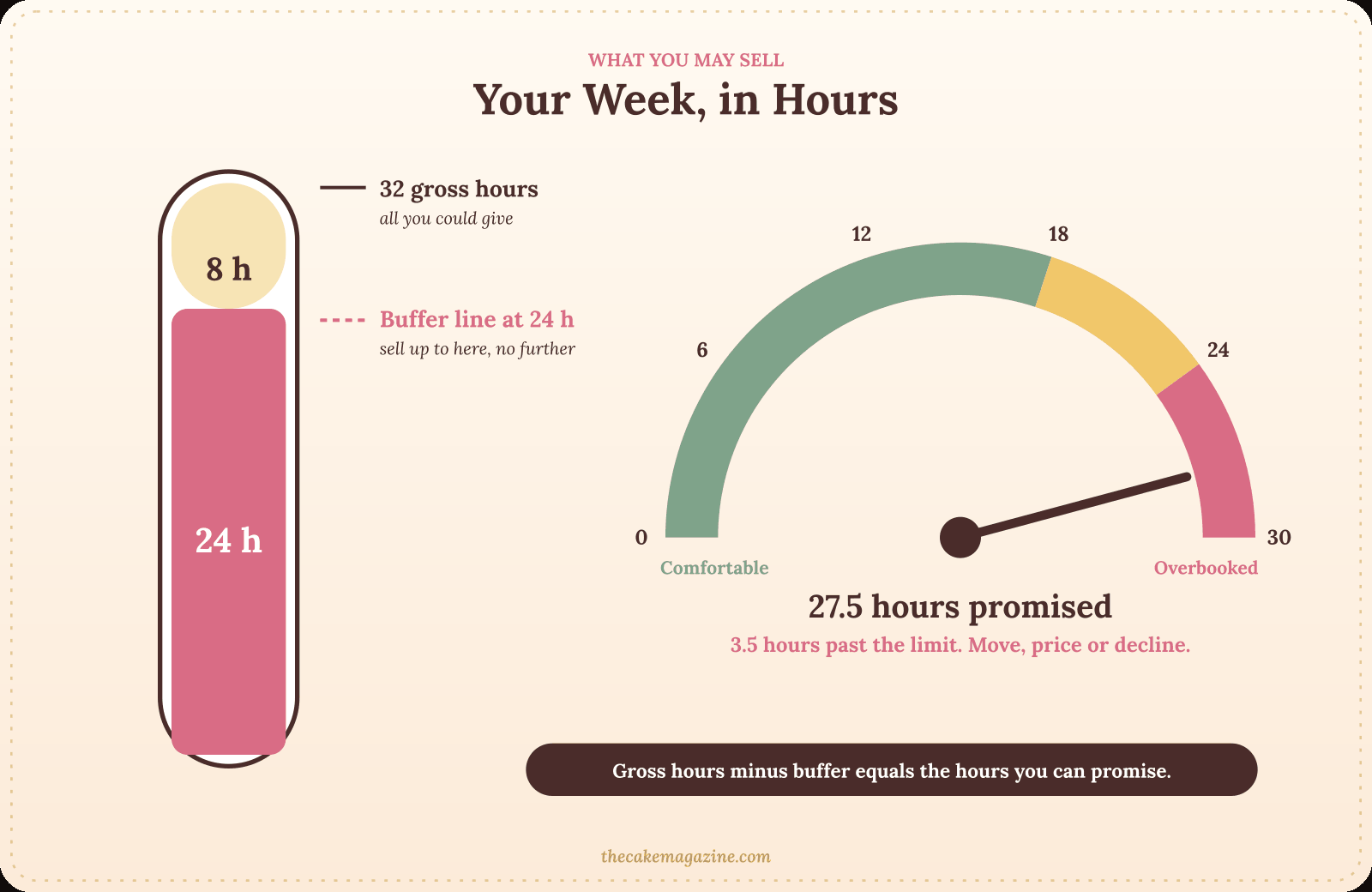
- Gross hours: the hours you could physically spend on baking tasks in a normal week, not counting your job, family or sleep.
- Planned hours: gross hours minus a buffer. This is the number you are allowed to sell.
- Order hours: the hands-on time one typical order takes, from shopping to hand-off.
Suppose a baker has about 32 gross hours available across a week. Keeping roughly a quarter free for surprises leaves around 24 planned hours. Everything you promise to customers has to fit inside those 24. The remaining eight are not wasted. They are what turns a stressful week into a normal one when the oven runs cold or a delivery runs long.
Why the buffer is not optional
Buffers feel like lost income, which is why new bakers skip them. Experienced bakers know the opposite is true. A buffer is what lets you keep promises. Frosting that will not smooth on a humid day, a delivery stuck behind a road closure, a toddler with a fever, a missing ingredient. None of these are rare. Over a year, they are certain.
A good starting point is to hold back about 20 to 30 percent of every day, then adjust after a few weeks of real data. Treat that time as booked. If you find yourself consistently using none of it, you can lower the buffer. If you keep eating through it, your hour estimates are too optimistic, which is useful information too.
Honesty check. Your first set of hour estimates will be too low. Almost everyone forgets cleanup, shopping and messages. Add those in now, and your cake order calendar will be right more often.
Time your cakes before you build the cake order calendar
You cannot plan with numbers you have never measured. Before you draw a single box on a calendar, spend two or three weeks timing your orders. It is dull work and it is the most valuable thing in this article. The point is not precision. The point is to replace “about two hours” with “last time it was actually three and a half.”
Use a notes app or a sheet of paper taped by the mixer. For each order, write down the minutes spent on each phase. Do not rely on memory afterward, because memory shrinks the unpleasant parts. Time them as they happen.
The phases to track
- Admin: messages, quote, confirming details, invoicing.
- Shopping and prep: buying supplies, weighing ingredients, preparing pans, tinting colors.
- Baking: mixing, panning, oven time you are actively tending, cooling and leveling.
- Filling and crumb coat: making fillings, stacking, the first coat and chilling.
- Decorating: final coat, piping, toppers, details.
- Packing and hand-off: boxing, labeling, cleanup, pickup or delivery.
Passive time, like a cake cooling for two hours, does not count as hands-on hours. But it does count as time on the clock, and it can block your oven, your counter or your fridge. We will deal with that in the bottlenecks section. For now, keep two columns: hands-on minutes and elapsed time.
Build a small library of order sizes
After a few weeks, group what you have measured into three to six standard order types. You do not need a hundred. Most bakeries find their orders cluster naturally. The illustrations below show how that might look for a baker who sells a few classic formats. Your numbers will be different, and that is the point.
- Six-inch two-layer buttercream cake: about 4 hours hands-on.
- Eight-inch three-layer cake with filling: about 5.5 hours.
- Two-tier cake with detailed decoration: about 11 hours.
- Two dozen frosted cupcakes: about 3 hours.
- Nine-by-thirteen sheet cake: about 4 hours.
Treat these as sample figures only. Your speed, your design style and your kitchen will produce different totals. If you offer a very simple cake style, such as the dot cakes covered in our dot cakes explainer, your numbers may be much smaller than the ones above. If you pipe elaborate flowers, they may be larger.
Once you have this library, every new inquiry becomes quick to evaluate. A customer asks for a design, you recognize it as the “eight-inch with filling” type, and you already know its cost in hours. That speed is a gift to you and to the customer, who gets a fast answer instead of a vague “let me check.”
How to build a cake order calendar step by step
With your order hours in hand, you can build the calendar itself. The structure is simple enough to draw on paper in ten minutes, and the same logic works in a spreadsheet or a shared digital calendar. Follow the steps in order, because each one depends on the one before.
Step 1: Set the daily limit
Decide how many hands-on hours you can give each day. Be realistic about your actual life. A baker with a day job might have two hours on a weekday evening and eight on a Saturday. A full-time baker might have six steady hours a day with Sunday off. Write the number at the top of each day. This is your gross limit for that day.
Then subtract the buffer. If Tuesday offers six gross hours and you hold back a quarter, your planned limit is about four and a half. That is the number the calendar will defend. Everything past it is, by design, a conversation rather than a default yes.
Step 2: Mark the days that are already gone
Before any orders go in, block the days you will not bake. Your day off, your child’s recital, the dentist, the week you are traveling, the holiday you spend with family. Blocking these first is the single biggest protection against burnout, and it is much harder to do after a customer has already been promised that date.
It also helps to block recurring chores that need real time: the weekly supply run, the bookkeeping hour, deep-cleaning the kitchen. If they only live in your head, a customer will end up living in their slot.
Step 3: Place every order on its work days, not just its due date
This is where a cake order calendar differs from a normal diary. Do not simply write “Smith birthday cake, Thursday 4 p.m.” Break the order into its work blocks and place each one on the day it will happen. A common pattern follows the three-day rhythm in our production schedule guide: bake and cool two days out, fill and crumb coat the day before, finish and box on the day.
For the sample six-inch birthday cake of 4 hours, that might look like this. Tuesday: 1.25 hours of baking and cooling work. Wednesday: 1.25 hours for filling and the crumb coat. Thursday: 1.5 hours for finishing, boxing and hand-off. The due date is only the last of three entries.
Step 4: Color-code by type
A calendar is only useful if you can read it in two seconds. A few consistent colors do more than any amount of notes. One color for baking blocks, one for filling and crumb coat, one for decorating, one for delivery or pickup, and a neutral color for blocked personal time. Add a bright mark for orders that have an allergy note, because that detail should never hide.
Step 5: Add a deposit status
An order that has not been paid for should not hold a slot forever. Mark each order as pending or confirmed. Pending orders can be shown in pencil or a lighter shade, and they expire if the deposit does not arrive by a stated date. For the policy side of this, see our guide to cake deposits and cancellation policies. A calendar full of unpaid maybes gives you false confidence and turns away real customers.
A simple rule that works. Only confirmed, deposited orders count against capacity as solid. Pending ones count as soft holds with an expiry date. When the hold expires, the time returns to the calendar automatically.
Step 6: Show the running load
At the bottom of each day, write the total hands-on hours you have placed, next to the planned limit. A line like “5.5 of 5” tells you instantly that a day is half an hour over. This one habit turns your cake order calendar from a record into a decision tool. If your tool cannot add numbers, write them by hand each time an order is confirmed.
A worked week: five cakes, one baker
Numbers make this real, so here is a full example built from the sample order library above. Remember, this is an illustration of the method with made-up figures, not a promise about how long your cakes take.
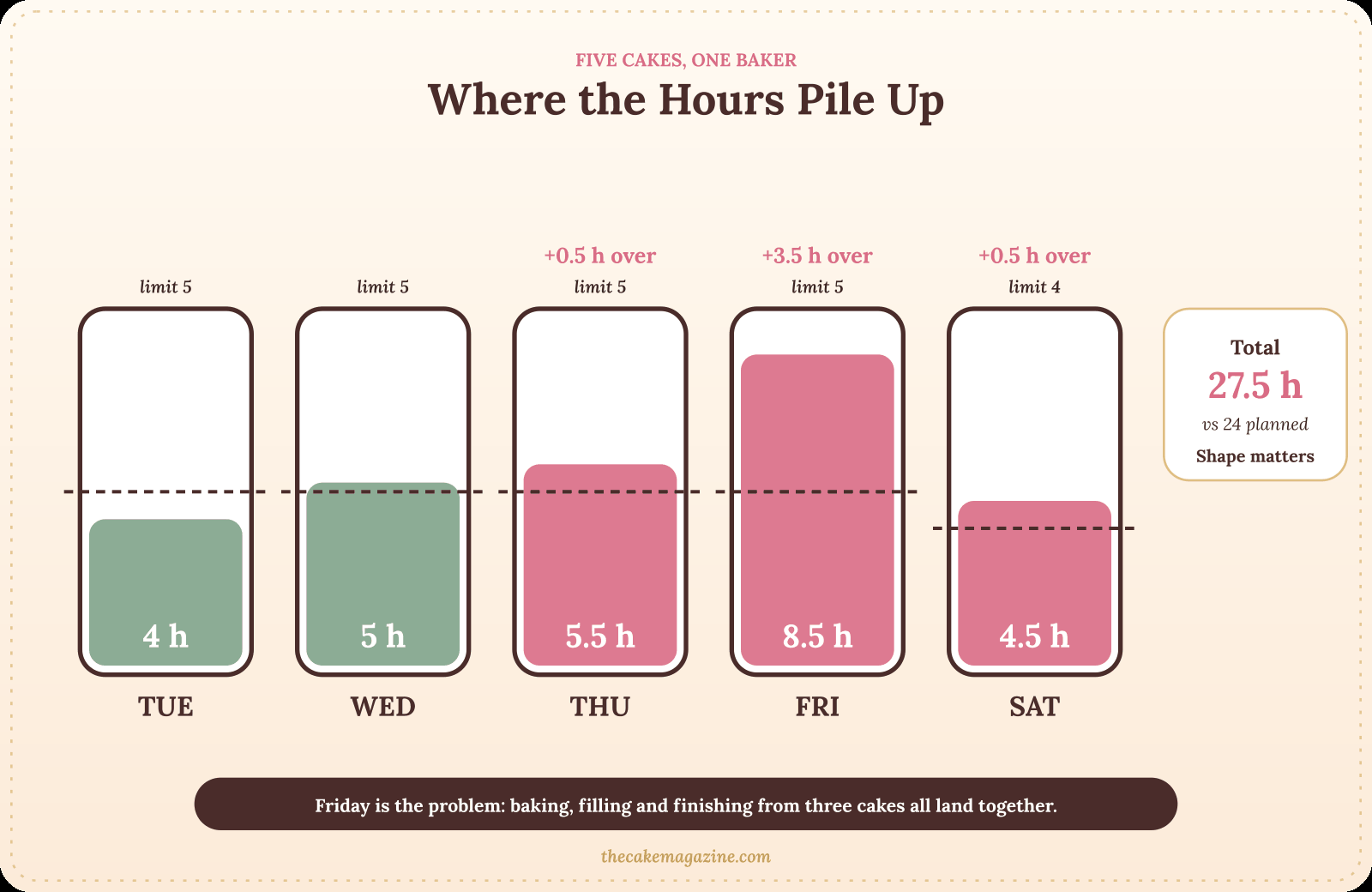
Our baker plans four hours on Saturday and five hours on each weekday from Tuesday to Friday, which gives 24 planned hours. Monday is the day off. The week, as it arrives in the inbox, looks like this.
- Cake A: six-inch birthday cake, Thursday 4 p.m. pickup, 4 hours.
- Cake B: eight-inch filled cake, Friday 2 p.m. pickup, 5.5 hours.
- Cake C: two-tier anniversary cake, Saturday 11 a.m. pickup, 11 hours.
- Cake D: two dozen cupcakes, Saturday 9 a.m. pickup, 3 hours.
- Cake E: sheet cake, Saturday 3 p.m. delivery, 4 hours.
Five cakes. That sounds like a perfectly reasonable week. Add up the hours and it comes to 27.5, against 24 planned. Already, the calendar is telling a different story from the cake count.
Spreading the hours across the days
Now place each block on its actual work day. In our example, baking and cooling happen two days out, filling the day before, and finishing on the day, with the two-tier cake starting earlier because it needs more of everything. The result: Tuesday carries 4 hours, Wednesday 5, Thursday 5.5, Friday 8.5 and Saturday 4.5.
Compare that with the limits. Tuesday has an hour to spare. Wednesday is exactly full. Thursday is half an hour over. Saturday is half an hour over. And Friday is 3.5 hours over a five-hour limit. The week is not too big in total by a huge margin. It is badly shaped, with the baking of three cakes, the finishing of one and the filling of another all landing on the same day.
Fixing the week without disappointing anyone
A calendar earns its keep at this point, because you can see the problem before anyone is let down. Here are the options in the order most bakers should try them.
- Move flexible work earlier. Sugar flowers, toppers, fondant details and fillings can usually be made days ahead. Shifting one hour of Cake C’s decoration to Tuesday and another to Saturday takes two hours off Friday.
- Offer a different date. If the sheet cake customer can pick up on Sunday or the following week, the order moves without drama.
- Change the order. A simpler design, fewer decorations or a smaller size may fit the available time.
- Decline kindly. If none of that works, it is better to say no today than to deliver a rushed cake on Saturday.
In this example, the cleanest answer is to offer the sheet cake customer another date, which removes 4 hours and the Friday and Saturday load that goes with it. Friday then sits at 7 hours. Shifting one hour of decoration to Tuesday and one to Saturday brings Friday to 5, Tuesday to 5 and Saturday to 3. Thursday remains half an hour over, which the buffer can absorb.
Notice what happened. Nobody got a worse cake. One order moved by a few days, two hours of work shifted to quieter days, and the week went from chaotic to ordinary. That is the whole point of keeping a cake order calendar that tracks hours.
Try it with your own numbers. Pick a past week you remember as stressful and rebuild it day by day with your real order hours. Chances are one day was far heavier than the others, and you can spot the same pattern next time before it happens.
The hidden hours your cake order calendar must hold
The worked week above only counted cake hours. In real life, plenty of other things take time and none of them look like orders. If they are not on the calendar, they will be paid for from your sleep. A realistic cake order calendar makes room for them on purpose.
Shopping and errands
Few bakers realize how much time disappears into supply runs. A trip for butter, cream cheese, boards, boxes and a missing piping tip can eat an hour or two, and it often happens twice a week. Decide on one or two standing shopping blocks, put them on the calendar, and build your orders around them. If an order needs a special ingredient, add the sourcing time to that order’s hours.
Cleanup between jobs
Washing bowls, wiping counters and resetting the station between cakes is real work. It is also a food safety step, particularly when you move from a nut-containing cake to an allergen-free one. If you have not built that into your order hours, add ten to twenty minutes per bake day, and more for allergen changeovers. Our cake allergen management guide explains why a careful reset matters.
Admin and messages
Quoting, answering questions, sending invoices and confirming details feel small, yet they add up to several hours a week for a busy baker. Give them a recurring block, even if it is only thirty minutes at the end of each day, so they stop leaking into baking time. Customers also appreciate a predictable reply window, which you can state in your auto-response.
Testing and new designs
If you are developing a new flavor or practicing a technique, that time is not free. Put it on the calendar in the quietest week you can find. Trying something new on top of a full week is a reliable way to ruin both.
Rest, family and the rest of life
This one is not optional. A cake order calendar that has no gaps is a calendar for a bake that will fall apart. Block the time you need for sleep, meals, family and a day off. Customers can wait a few extra days for a date. A burned-out baker eventually stops taking orders at all.
- Standing blocks to place first: day off, shopping, admin, weekly cleaning, bookkeeping.
- Floating blocks: testing, photography, restocking, learning a new technique.
- Protected blocks: anything involving your health, your family or a deadline outside the bakery.
Bottlenecks: oven, fridge, decorating and driving
Hours tell you whether you have time. Bottlenecks tell you whether you have room. A baker can have plenty of hours left on Friday and still be stuck, because the one thing every cake needs at the same moment, whether that is the oven, a fridge shelf or the decorating counter, is already occupied. A thoughtful cake order calendar tracks both kinds of limits.

The oven
Most home ovens fit two or three cake pans at a time, and layers of different sizes may need different temperatures or times. If you have four cakes to bake in one day, count the oven rounds. A single round of two eight-inch layers might take about 30 to 40 minutes plus preheating and a short rest. Three rounds is already two hours of oven time, and you cannot bake while it is full.
Spread bake days. Baking some layers two days before the finish date is normal practice and gives the oven a lighter load. Wrap the cooled layers well and keep them as your recipe and food safety plan allow. If you are unsure about holding times for particular fillings or cakes, check the food-safety resources linked in our cake food safety guide.
The fridge
Fridge space is the bottleneck nobody plans for until a customer’s cake will not fit. Cakes with perishable fillings or frostings must be chilled, and a tall cake box takes a lot more room than its footprint suggests. A single crowded shelf can force you to stack cakes unsafely or leave one out too long.
Count shelf slots the way you count hours. If you have three usable shelves and each can hold one boxed cake, you can chill three at a time. On a heavy Friday, that number can be the real limit on how many cakes you finish. Treat chilling time as a booking on the cake order calendar, especially for cakes that need an overnight set.
The decorating counter
Decorating is the longest and least predictable phase, and it usually needs a clean, uncluttered surface with good light. Two decorating jobs cannot share a counter at the same moment without a mess. If your kitchen has one clean surface, only one cake can be in the decorating phase at a time. Plan your decorating blocks in sequence, not in parallel.
A turntable, a cool room and a calm hour are worth more than extra hands here. If you are still building your workspace, our guide to home cake business kitchen setup covers how to arrange zones so each job has its own place.
Delivery and pickup windows
Driving is the most forgotten block of all. A cake delivered across town may take an hour or more once you count packing the car, parking and set-up, and it cannot be rushed. If two deliveries land close together, your cake order calendar should show them as real time, not as a footnote. Our cake delivery workflow guide goes deeper on routes and hand-off.
Pickups are easier, but they carry their own risk: customers arrive early, late or both. Offer fixed windows of thirty to sixty minutes, and keep your hand-off block free of other tasks. If a customer shows up while you are mid-decoration on another cake, someone loses.
Oven check
Count the number of bake rounds for the day, not just the number of cakes. Add preheat and cooling-rack space. If the total passes your planned limit, move a bake to another day.
Fridge check
Count boxed cakes against usable shelf slots. Perishable fillings need chilling, so a full fridge is a hard limit. Note what must be chilled overnight.
Counter check
Only one cake should be in the decorating phase on a clean surface at a time. Stack decorating blocks one after another, never side by side.
Car check
Count deliveries and their drive time. Keep at least half an hour between hand-offs, and never schedule a delivery during a decorating block.
Booking rules for a cake order calendar that holds up
A calendar can show you the truth and still fail if you do not act on it. The second half of capacity planning is a short set of rules that make the right answer automatic. Write these down once, and you will not need to negotiate with yourself every time an inquiry lands in a weak moment.
Rule 1: The calendar decides, not your mood
When an inquiry arrives, check the cake order calendar before you answer. Do not reply with “sure, I think I can fit that in” from your phone. Open the calendar, place the order’s blocks, and read the load. If every day stays under its limit, say yes. If not, use the options in the next sections.
Rule 2: Set a cap on large orders
Big cakes take big chunks of time. A single eleven-hour order can swallow almost half a week, so give large and complex orders their own limit: for instance, one major custom cake per week, or two per month for wedding-size work. This keeps one huge cake from crowding out everything else. For menu choices that make this easier, see our guide to cake business menu strategy.
Rule 3: Lead time depends on size
A plain cupcake order may need only a few days of notice, while a decorated tiered cake needs weeks. State your minimum lead times on your order form and website so customers can plan. Longer lead times for bigger orders also give you time to spread the hours across more days, which is the entire secret of a smooth week.
Rule 4: A date is held only when it is paid
Until a deposit arrives, a date belongs to nobody. This protects you from a pile of soft maybes and treats customers evenly. Put an expiry on every quote, such as seven days, and let the calendar release the date when the time is up. A fair deposit policy, covered in our deposits and cancellation guide, is what makes a cake order calendar trustworthy.
Rule 5: Collect the facts before you commit
Hours depend on details: size, flavors, design, allergies, delivery distance. If you quote without them, your hour estimate will be a guess. A good custom cake order form asks for these up front, and a short consultation fills in anything unclear for bigger orders. Better information means better hours, and better hours mean a more accurate calendar.
Rule 6: Leave one slot open on purpose
Keep a deliberately empty period in each week that you do not sell until the last few days. This is your floating slot for emergencies, repairs, a failed layer, a friend in need, or a profitable last-minute order priced at a rush rate. If nothing happens, you get a lighter day, which is its own reward.

A quick decision path
You can compress the rules above into three questions to ask before every confirmation.
- Does it fit? Place the order’s blocks. If no day goes over its limit, and the oven, fridge and car are free, it fits.
- Does it fit if I move something small? Shifting flexible work to a quieter day often solves it without touching other customers.
- If neither, is there a fair alternative? Offer another date, a simpler design or a waitlist spot. If nothing works, a polite no is the kindest answer.
Rush orders, waitlists and the graceful no
Saying no is the hardest skill in running a small bakery, and the most useful. The calendar gives you a reason that is not personal. It is not that you dislike the customer or their cake. It is that the week is full, and you want to make their cake well rather than badly.
Pricing a rush order
A rush order costs more than its hours. It disrupts the week, risks the buffer and often forces you to turn down other work. Many bakers add a rush fee for orders placed inside their normal lead time. The fee should reflect the real cost of the disruption, and it should be stated plainly in your policies, not invented on the spot. Our guide to how to price cakes explains how to fold urgency into your pricing.
Only accept a rush order if your cake order calendar shows genuine room for it, ideally in your floating slot. If the only way to fit it is to eat into your buffer or skip a day off, the rush fee is not high enough, or the answer should be no.
Running a waitlist
A waitlist turns a no into a maybe, which feels better for both sides. When a date is full, offer to add the customer to a list for that date, and tell them honestly how likely a spot is. If a cancellation opens space, contact the list in order. Keep it simple: a name, a date, a phone number and a note of the cake size, so you can tell instantly whether the freed hours fit.
Words that work
Scripts take the sting out of difficult messages. Adapt these to your own voice, and keep them somewhere you can copy and paste.
- Date is full: “Thank you so much for thinking of me. I am fully booked for that weekend, but I have openings on the 14th and the 21st. Would either of those work? I can also add you to my waitlist for your original date.”
- Too short a notice: “I would love to help. For orders under five days I charge a rush fee of the stated amount, and I only have room for one this week. If that suits you, I can hold it until tomorrow.”
- Design too complex for the time: “That design takes more time than I have that week. I could do a simpler version with the same colors, or a later date for the full design. Which would you prefer?”
- Politely declining: “I am sorry, I cannot take that one on and do it justice. Thank you for asking, and I hope the celebration is wonderful.”
Notice that each one offers a real option and avoids blaming the customer. That tone keeps people friendly toward your bakery even when the answer is no, and it often leads to a booking for a later date.
A no is a product decision. Every cake you refuse is a cake you did not rush, burn out over or deliver late. A cake order calendar lets you make that decision once, calmly, rather than five times a week under pressure.
Peak weeks, holidays and blackout dates
Some weeks are simply bigger than others. Weddings bunch up in certain months, graduations arrive together in late spring, and holiday weeks bring a flood of requests for the same few days. A cake order calendar that treats every week identically will fail in exactly the weeks where the money is best. Plan the peaks on purpose, ahead of time.
Look backward, then forward
If you have been baking for a year, scroll back through your past orders and mark the heavy stretches. Even a single year shows a pattern: the week before a certain holiday, the Saturdays in early summer, the long weekend that always fills. If you are new, ask local bakers, check your own community calendar for graduations, school events and festivals, and assume the busiest weeks will repeat.
Then look forward. Write the next twelve months on one page and mark likely peaks, planned vacations, family events and any week you already know will be hard. This one-page overview is your master cake order calendar. The weekly calendar sits underneath it, and the overview tells you which weeks to guard.
Use blackout dates and peak limits
Blackout dates are days you will not take orders, no matter what. They protect important personal time, and they can be announced well in advance so customers plan around them. Common examples are your own holidays, a family wedding or a week of rest after a peak.
Peak limits work differently. On a heavy week, you might cap the number of orders or total hours below your usual planned limit, because your buffer needs to be larger when everything is tighter. If a normal week holds 24 planned hours, a holiday week might hold 20, leaving more room for the surprises that busy periods love to bring.
Open the books early for peaks
For busy periods, customers who plan early are your best customers. Announce when you will open orders for the peak, state the cap and the deposit deadline, and let the first people in. A clear opening date stops the scramble of last-minute requests that tends to wreck a holiday week. It also lets you see how full the weeks are in advance and adjust the limits if needed.
Before the peak
Mark blackout dates, set a lower planned limit, announce when orders open and decide your last day for new requests. Prepare make-ahead components, such as toppers and fillings, in quieter weeks.
During the peak
Review the calendar every morning. Stop taking rush orders unless a cancellation frees space. Keep your buffer and your sleep intact, and let simple cakes carry the volume.
After the peak
Block a recovery day or two. Compare planned hours with real ones, note what ran long and update your order library. Thank repeat customers and open the next window.
Plan a heavy day by the clock
On a peak day, thinking in hours is not enough. You need to see the day laid out in order, with the passive time visible. A cake that spends two hours cooling frees you to start another task, but a cake that needs a three-hour chill has no such freedom for the fridge. Sketching a heavy day around the clock helps you stack the work so your hands and your equipment are both busy, never both idle and never both overloaded.

A tidy heavy day often follows this rhythm. Early morning is for oven work, while your energy is highest and the kitchen is cool. Mid-morning moves into cooling, filling and small prep tasks. Early afternoon is for crumb coats and chilling. Late afternoon belongs to final decoration, with quiet and light. Evening is for packing, cleanup and tomorrow’s plan. You can shift the pattern, but keeping it consistent makes your cake order calendar easier to read and your days easier to live.
Do not trade safety for speed. Heavy weeks tempt people to leave cakes with perishable fillings out too long or skip a chill. Keep your timing within safe limits and read the guidance at the USDA Food Safety and Inspection Service when you are unsure.
Paper, spreadsheet or shared calendar: choosing a format
The best format is the one you will check every single day. A beautiful system that you open once a week is worse than a crumpled planner on the fridge. Here is how the common choices compare in practice, without any brand in particular in mind.
A paper planner or wall calendar
Paper is fast, visible and impossible to ignore when it hangs in your kitchen. A large monthly wall calendar plus a weekly page is enough for many solo bakers. You can see the whole week at a glance, you can write the running hour total in the corner and you can use colored pens for the categories. The downsides are obvious: it cannot be shared, searched or backed up, and a splash of batter can ruin a week.
A spreadsheet
A spreadsheet is a good middle step. It can add hours for you, flag a day that goes over the limit, and store order details in the same place. A simple layout has one row per work block with columns for date, order, task, hours and status, plus a small summary showing planned versus placed hours for each day. Spreadsheets reward bakers who like numbers, and they make it easy to learn from past weeks. They are less friendly on a phone in the middle of a messy kitchen.
A shared digital calendar
A shared digital calendar on your phone and computer is the easiest way to see your week anywhere, including at the moment a customer messages you. Create a separate calendar for the bakery so personal and business events can be shown together or hidden separately. Give each work block its own entry with the order name and the hours in the title, and use colors for task types. If you work with a helper or a partner, shared access keeps everyone on the same page.
Putting them together
Many bakers combine formats. A wall calendar for the big picture and peaks, a digital calendar for the day-to-day, and a short spreadsheet for the hour totals. Whichever you choose, check three things before you commit.
- Can you see a week at once? If you have to scroll or tap through days, load problems will hide.
- Can you see the hour total? If not, add it by hand next to each day.
- Can you reach it when a message arrives? The calendar only helps if you open it before you answer.
Whatever tools you choose, keep your order details, such as flavors, allergies, design notes and contact info, in a consistent place. Your calendar tells you when work happens, and the order record tells you what the work is. Together, they form the backbone of your bakery’s workflow, along with the costing described in our cake cost calculator guide.
Cake order calendar mistakes and how to fix them
Almost every baker makes these mistakes at some point. Knowing them in advance lets you spot the early signs and correct course before a week goes wrong.
The calendar shows only due dates
What happens: every order looks like a single event on its pickup day, so the three earlier days of work are invisible, and Thursday is secretly packed.
How to check: pick any order and ask which day you will bake it. If the calendar cannot answer, it is a diary rather than a plan.
Fix it: split each order into bake, fill and finish blocks, and place each one on its actual work day. Add the day totals at the bottom.
Hour estimates are optimistic
What happens: every day runs over, you work late, and the calendar says everything was fine. This usually means cleanup, shopping and messages were left out.
Fix it: time three weeks of real orders, include all phases and update your order library. Multiply the first draft by a safety factor if you must, then tighten it with data.
No buffer
What happens: a single failed layer or a late delivery cascades into three late cakes, because there was no slack to absorb it.
Fix it: reserve 20 to 30 percent of each day and one flexible slot a week. Treat it as booked, and release it only in the last two or three days.
Unpaid holds that never expire
What happens: your cake order calendar fills with maybes. You turn away paying customers for a date nobody will confirm.
Fix it: give every quote an expiry date, mark pending holds in pencil or a light color, and release the time when the deadline passes. Your deposit policy should say exactly this.
Counting cakes instead of hours
What happens: a simple cake and an elaborate one count the same, so a week of three big cakes quietly doubles your workload.
Fix it: add the hour totals, and set limits on large orders separately from the total limit.
Ignoring the oven, fridge and car
What happens: hours look fine but two cakes need the same fridge shelf, or two deliveries overlap.
Fix it: add a quick bottleneck check to your booking routine, as described earlier, and block chilling and driving time as real entries.
Saying yes from the couch
What happens: you accept an order by text without opening the calendar, then discover the conflict the next morning.
Fix it: a standing reply, such as “Let me check my calendar and I will confirm within a few hours,” gives you time to make a real decision.
Setups for solo bakers, weekend bakers and small teams
The same method flexes to fit very different lives. The only thing that changes is how many hours you have, where they fall and who shares them. Here are three common situations and how to adapt a cake order calendar to each.
The weekend baker with a day job
If your hands-on time lives in evenings and weekends, your calendar has uneven days. Two hours on a weeknight, eight on a Saturday, and a few on Sunday. Plan work backward from the pickup day. Bake on the weeknight, fill and crumb coat on Friday evening, and finish on Saturday. Limit orders to one or two per weekend, and set lead times long enough that you never need a weekday rush. Choose designs that suit the time you have, like the simple styles in our mini and one-bite cakes guide.
The full-time solo baker
With more hours, the main risk is overfilling them. A full-time baker can easily plan thirty hours a week and then be shocked by how much time admin, shopping and delivery consume. Set daily limits that are honest about those extras, keep a standing day off and protect the floating slot. Your cake order calendar should show weekly totals in a visible spot, so you notice when you are consistently near the ceiling. That is often the moment to raise prices rather than add hours.
The small team
With a helper or partner, capacity is no longer a single number. A person who is strong at baking but slow at decorating changes how you assign blocks. Track hours per person, and mark each block with a name. Hand-offs need clear notes, because the cake that moves from one person to another is where details get lost. Shared digital calendars shine here, as long as everyone updates the same one. Our guide to starting a cake business covers the broader setup for growing past one pair of hands.
A weekly review that takes twenty minutes
The best habit you can build around a cake order calendar is a short review at the same time every week. Pick a quiet slot, such as Sunday evening, and walk through four questions.
- What did the last week really take? Compare placed hours with actual hours and note which orders ran long.
- What is coming in the next two weeks? Scan for days over their limit and fix them now, while changes are easy.
- Which holds are about to expire? Follow up on unpaid quotes or release the time.
- Is my buffer still intact? If you are always dipping into it, adjust your limits or your prices.
Over a few months, these reviews teach you more about your bakery than any course could. You will learn how long your cakes really take, which orders are worth the hours, and when to say no. For a sense of the finances behind those choices, see our guide on how to price cakes, and for general baking technique references, the King Arthur Baking cake guide is a dependable place to refresh your methods.
Cake order calendar FAQ
What is a cake order calendar?
A cake order calendar is a schedule that shows every cake order along with the hours of work it needs on each day, not only its pickup date. It helps a baker see how full each day is, protect a buffer, and decide whether a new order fits before accepting it.
How many cakes can I take in a week?
There is no single number, because it depends on size, design and your available hours. Add up the hands-on hours your typical orders need, compare them with your planned weekly hours after a buffer, and use that total instead of a cake count. A cake order calendar built on hours handles different sizes fairly.
How do I estimate how long a cake takes?
Time a few real orders from shopping to hand-off, tracking each phase separately and writing the minutes down as you go. Group them into a handful of standard order types. Your first guess will probably be low, so include cleanup, messages and packing in every estimate.
How big should my buffer be in a cake order calendar?
A common starting point is to leave about 20 to 30 percent of each day unbooked, plus one flexible slot a week. After a few weeks of real data, adjust it. If you never touch it, reduce it slightly. If you always use it, your estimates need to rise.
Should I use a paper or digital cake order calendar?
Use whichever one you will actually check every day. Paper is quick and visible, spreadsheets add up hours for you, and shared digital calendars are best when you need access on the go or work with others. Many bakers combine a wall calendar with a digital one.
How far ahead should customers book?
Longer for bigger cakes. Simple orders such as cupcakes may need only a few days, while tiered or heavily decorated cakes often need several weeks. State your minimum lead times clearly on your order form, so your cake order calendar has room to spread the work across several days.
When should I charge a rush fee?
Many bakers add a fee when an order is placed inside their normal lead time, since it disrupts the week and may displace other work. Publish the policy in advance and apply it consistently. Only accept a rush order if the calendar shows real room for it.
What do I do if two orders land on the same day?
Check the hour totals first, then the oven, fridge and decorating counter. Shift flexible tasks to quieter days, offer a different pickup time or date, or simplify one design. If none of that works, decline one order politely. A cake order calendar makes the conflict visible early.
Should unpaid orders be on the calendar?
Show them as soft holds with an expiry date, in pencil or a lighter color, and do not count them as confirmed. When the deadline passes without a deposit, release the time. This keeps the cake order calendar honest and avoids turning away paying customers.
How do I plan holiday weeks on a cake order calendar?
Mark likely peak weeks a year ahead, lower your planned hours slightly to keep a larger buffer, and announce when orders open and close. Make flexible components in quieter weeks. Review the calendar every morning during the peak and stop taking rush orders unless a cancellation opens space.
Can I use my cake order calendar when I have a helper?
Yes. Track hours per person, label each block with a name, and keep one shared calendar that everyone updates. Be clear about who owns each hand-off, because details are easiest to lose when a cake changes hands.
How often should I review my cake order calendar?
A short weekly review works well. Compare planned and actual hours, scan the next two weeks for overloaded days, release expired holds and check that your buffer is intact. Twenty minutes a week is usually enough to catch problems while they are still easy to fix.
Final thoughts
A cake order calendar is a small tool with an outsized effect on how a bakery feels to run. It takes the question “can I do this?” out of the realm of mood and guilt and puts it where it belongs, in plain numbers you can see. Time your cakes, set honest daily limits, hold a buffer, place each order on its work days and let the totals tell you the truth.
You do not have to build the perfect system this week. Start with the next two weeks. Time one order, write down your daily limits, and block your days off. Then try the weekly review once. Over a few weeks your cake order calendar will become the quiet partner that keeps your promises realistic, your customers happy and your weekends your own.
If your own week looks different from the examples here, adjust the numbers and keep the method. The details belong to you, and the structure of hours, buffers and clear rules works whether you sell five cakes a month or fifty.
Editorial note: reviewed and updated November 2026. This guide offers general business and kitchen-planning information only, not legal, tax, insurance or food safety advice. All hour figures, order sizes and schedules are illustrations to adapt, not benchmarks or results from any test. Local rules, including cottage food and licensing requirements, vary, so confirm them with your state and local agencies.